In AJAX, XMLHttpRequest is extremely significant. XMLHttpRequest is used to exchange data with or from a web server in the background while the user/client works in the foreground, and then update a portion of the web page with the received data without refreshing the entire site.

We may also state that XMLHttpRequest (XHR) is utilized by many web browser scripting languages such as JavaScript, JScript, VBScript, and others to exchange XML data with the web server over HTTP. Aside from XML, XMLHttpRequest may also get data in other forms such as JSON, etc. It establishes an asynchronous connection between the client and server side.
Syntax
variableName = new XMLHttpRequest()A new XMLHttpRequest object may be created by using the new keyword and the XMLHttpRequest() constructor. This object must be generated before invoking the open() method to initialize it, and then sent to the web server using the send() function.
XMLHttpRequest Object Methods
The XMLHttpRequest object supports the following methods:
Sr.No.
Method Name & Description
1.
New XMLHttpRequest()
It creates an XMLHttpRequest() object.
2.
getAllResponseHeaders()
It is used to obtain header information.
3.
getResponseHeader()
It’s used to obtain specific header information.
4.
open(method, url, asynchronous, user, psw)
It is used to set up the request parameters.
Here,
method: request type (GET, POST, or other kinds)
URL: File Location
Async: Set the asynchronous set to true or the synchronous set to false.
User: for optional user name.
psw: optional password.
5.
send()
It sends queries to the web server. It is mostly used for GET requests.
6.
send(string)
It sends requests to the server. It is mostly used for POST requests.
7.
setRequestHeader()
It adds key/value pairs to the header.
XMLHttpRequest Object Properties:
The XMLHttpRequest object contains the following properties:
Sr.No.
Property Name & Description
1.
onreadystatechange
Set the callback function for handling request state changes.
2.
readyState
It is used to store the status of an XMLHttpRequest. It has the following values.
- It shows that the request is not initialized.
- It reflects the server connection that was formed.
- It reflects the request received.
- It shows that the request is being processed.
- It indicates that the request is finished and the response is ready.
3.
responseText
It returns the response data as a string.
4.
responseXML
It returns the response data as XML data.
5.
Status
It returns the request’s status number. For instance —
- 200: for OK
- 403: for Forbidden
- 404: for Not Found
6.
StatusText
It is used to return the status message. Examples include OK, Not Found, and so on.
Use of XMLHttpRequest
Following an overview of XMLHttpRequest’s core syntax, methods, and properties, we will learn how to utilize it in practice. To utilize XMLHttpRequest in your software, first follow the key steps listed below:
Step 1: Create an object of XMLHttpRequest.
var variableName = new XMLHttpRequest()Step 2: After establishing an XMLHttpRequest object, add a callback method that will be triggered when the web server responds.
XMLHttpRequestObjectName.onreadystatechange = function(){
   // Callback function body
}
XMLHttpRequestObjectName.open(method, url, async)
XMLHttpRequestObjectName.send()
Step 3: Use open() and send() routines to submit a request to the web server.
Let us explain the working of XMLHttpRequest with the following example:
Example
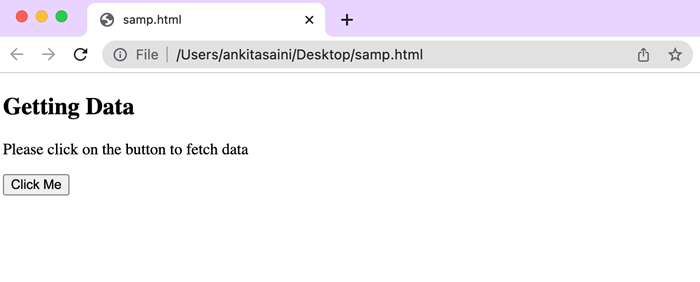
In the following example, we will retrieve data from the server. To retrieve the data from the server, we will click the “Click Me” button. So, when we click the “Click Me” button, the displayDoc() method is executed. In the displayDoc() function, we build an XMLHttpRequest object. Then we define a call-back method to handle the server response. Then we use the XHR object’s open() function to initialize the request with the HTTP GET method and the server URL, “https://jsonplaceholder.typicode.com/todos”. Then, we use the send() method to send the request.
So, when the server answers to the request, the “onreadystatechange” property calls the callback method using the current state of the XMLHttpRequest object. If the “ready state” property is set to 4 (which indicates that the request has been completed) and the “status” property is set to 200 (indicating a successful response), the response data is extracted from the “responseText” property and displayed using the sample element’s “innerHTML” property.
If an error is encountered during the request, the else expression in the callback function will be executed. So this is how we retrieve info from the server.
<!DOCTYPE html>
<html>
<body>
<script>
   function displayDoc() {
      // Creating XMLHttpRequest object
      var myObj = new XMLHttpRequest();
      // Creating a callback function
      myObj.onreadystatechange = function() {
         if (this.readyState == 4 && this.status == 200) {
            document.getElementById("sample").innerHTML = this.responseText;
         }else{
            console.log("Error Found")
         }
      };
      // Open the given file
      myObj.open("GET", "https://jsonplaceholder.typicode.com/todos", true);
      // Sending the request to the server
      myObj.send();
   }
</script>
<div id="sample">
   <h2>Getting Data</h2>
   <p>Please click on the button to fetch data</p>
   <button type="button" onclick="displayDoc()">Click Me</button>
</div>
</body>
</html>
Output
Conclusion
The fundamental object of AJAX is XMLHttpRequest, which allows asynchronous communication between a web browser and a web server. So, in the following post, we’ll see how to send a request using an XMLHttpRequest object.
AJAX: Database Operations
To demonstrate how simple it is to get information from a database using AJAX, we will generate MySQL queries on the fly and show the results on “ajax.html”. But first, let us prepare the groundwork. The command to create a table is as follows.
NOTE: We assume you have appropriate privileges to conduct the following MySQL actions.
CREATE TABLE 'ajax_example' (
   'name' varchar(50) NOT NULL,
   'age' int(11) NOT NULL,
   'sex' varchar(1) NOT NULL,
   'wpm' int(11) NOT NULL,
   PRIMARY KEY  ('name')
)
Dump the following data into this table with the following SQL statements:
INSERT INTO 'ajax_example' VALUES ('Jerry', 120, 'm', 20);
INSERT INTO 'ajax_example' VALUES ('Regis', 75, 'm', 44);
INSERT INTO 'ajax_example' VALUES ('Frank', 45, 'm', 87);
INSERT INTO 'ajax_example' VALUES ('Jill', 22, 'f', 72);
INSERT INTO 'ajax_example' VALUES ('Tracy', 27, 'f', 0);
INSERT INTO 'ajax_example' VALUES ('Julie', 35, 'f', 90);
Client-Side HTML File
Our client-side HTML file, ajax.html, will include the following code:
Example
<html>
<body>
<script language = "javascript" type = "text/javascript">
   <!--
   //Browser Support Code
   function ajaxFunction() {
      var ajaxRequest; // The variable that makes Ajax possible!
      try {
         // Opera 8.0+, Firefox, Safari
         ajaxRequest = new XMLHttpRequest();
      } catch (e) {
         // Internet Explorer Browsers
         try {
            ajaxRequest = new ActiveXObject("Msxml2.XMLHTTP");
         } catch (e) {
            try {
               ajaxRequest = new ActiveXObject("Microsoft.XMLHTTP");
            } catch (e) {
               // Something went wrong
               alert("Your browser broke!");
               return false;
            }
         }
      }
      // Create a function that will receive data
      // sent from the server and will update
      // div section in the same page.
      ajaxRequest.onreadystatechange = function() {
         if(ajaxRequest.readyState == 4) {
            var ajaxDisplay = document.getElementById('ajaxDiv');
            ajaxDisplay.innerHTML = ajaxRequest.responseText;
         }
      }
      // Now get the value from user and pass it to
      // server script.
      var age = document.getElementById('age').value;
      var wpm = document.getElementById('wpm').value;
      var sex = document.getElementById('sex').value;
      var queryString = "?age = " + age ;
      queryString +=  "&wpm = " + wpm + "&sex = " + sex;
      ajaxRequest.open("GET", "ajax-example.php" + queryString, true);
      ajaxRequest.send(null);
   }
   //-->
</script>
<form name = 'myForm'>
   Max Age: <input type = 'text' id = 'age' /> <br />
   Max WPM: <input type = 'text' id = 'wpm' /> <br />
   Sex:
   <select id = 'sex'>
   <option value = "m">m</option>
   <option value = "f">f</option>
   </select>
   <input type = 'button' onclick = 'ajaxFunction()' value = 'Query MySQL'/>
</form>
<div id = 'ajaxDiv'>Your result will display here</div>
</body>
</html>
NOTE: The method of sending variables in the query follows the HTTP standard and has formA.
URL?variable1 = value1;&variable2 = value2;The code above will display the screen seen below.
Output
After you’ve entered your information, your results will be displayed in this area.
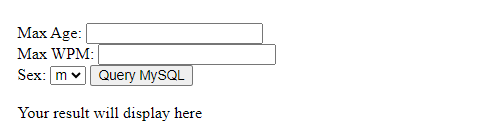
NOTE: This is a false screen.
Server-Side PHP File
Your client-side script is ready. Now we must develop a server-side script that will retrieve age, wpm, and sex from the database and provide it to the client. Put the following code in the “ajax-example.php” file.
<?php
$dbhost = "localhost";
$dbuser = "dbusername";
$dbpass = "dbpassword";
$dbname = "dbname";

//Connect to MySQL Server
mysql_connect($dbhost, $dbuser, $dbpass);

//Select Database
mysql_select_db($dbname) or die(mysql_error());

// Retrieve data from Query String
$age = $_GET['age'];
$sex = $_GET['sex'];
$wpm = $_GET['wpm'];

// Escape User Input to help prevent SQL Injection
$age = mysql_real_escape_string($age);
$sex = mysql_real_escape_string($sex);
$wpm = mysql_real_escape_string($wpm);

//build query
$query = "SELECT * FROM ajax_example WHERE sex = '$sex'";
if(is_numeric($age))
   $query .= " AND age <= $age";
if(is_numeric($wpm))
   $query .= " AND wpm <= $wpm";

//Execute query
$qry_result = mysql_query($query) or die(mysql_error());
//Build Result String
$display_string = "<table>";
$display_string .= "<tr>";
$display_string .= "<th>Name</th>";
$display_string .= "<th>Age</th>";
$display_string .= "<th>Sex</th>";
$display_string .= "<th>WPM</th>";
$display_string .= "</tr>";
// Insert a new row in the table for each person returned
while($row = mysql_fetch_array($qry_result)) {
   $display_string .= "<tr>";
   $display_string .= "<td>$row[name]</td>";
   $display_string .= "<td>$row[age]</td>";
   $display_string .= "<td>$row[sex]</td>";
   $display_string .= "<td>$row[wpm]</td>";
   $display_string .= "</tr>";
}
echo "Query: " . $query . "<br />";
$display_string .= "</table>";
echo $display_string;
?>
<?php
$dbhost = “localhost”;
$dbuser = “dbusername”;
$dbpass = “dbpassword”;
$dbname = “dbname”;
//Connect to MySQL Server
mysql_connect($dbhost, $dbuser, $dbpass);
//Select Database
mysql_select_db($dbname) or die(mysql_error());
// Retrieve data from Query String
$age = $_GET[‘age’];
$sex = $_GET[‘sex’];
$wpm = $_GET[‘wpm’];
// Escape User Input to help prevent SQL Injection
$age = mysql_real_escape_string($age);
$sex = mysql_real_escape_string($sex);
$wpm = mysql_real_escape_string($wpm);
//build query
$query = “SELECT * FROM ajax_example WHERE sex = ‘$sex'”;
if(is_numeric($age))
$query .= ” AND age <= $age”;
if(is_numeric($wpm))
$query .= ” AND wpm <= $wpm”;
//Execute query
$qry_result = mysql_query($query) or die(mysql_error());
//Build Result String
$display_string = “<table>”;
$display_string .= “<tr>”;
$display_string .= “<th>Name</th>”;
$display_string .= “<th>Age</th>”;
$display_string .= “<th>Sex</th>”;
$display_string .= “<th>WPM</th>”;
$display_string .= “</tr>”;
// Insert a new row in the table for each person returned
while($row = mysql_fetch_array($qry_result)) {
$display_string .= “<tr>”;
$display_string .= “<td>$row[name]</td>”;
$display_string .= “<td>$row[age]</td>”;
$display_string .= “<td>$row[sex]</td>”;
$display_string .= “<td>$row[wpm]</td>”;
$display_string .= “</tr>”;
}
echo “Query: ” . $query . “<br />”;
$display_string .= “</table>”;
echo $display_string;
?>
https://www.tutorialspoint.com/ajax/images/database_operations.jpgIf you finished this course successfully, you now understand how to develop AJAX apps using MySQL, PHP, HTML, and Javascript.